
安装
CentOS/Rocky/Alibaba Cloud Linux
sudo yum install -y iftop nethogsUbuntu/Debian
sudo apt update && sudo apt install -y iftop nethogs使用
# 查看流量
sudo iftop -i eth0 -P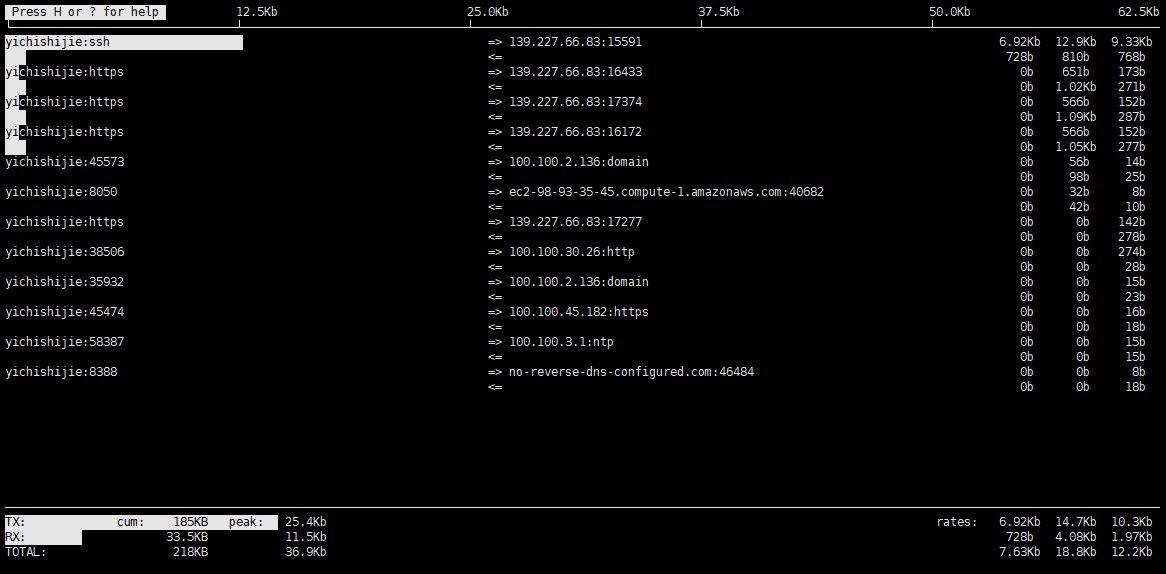
sudo yum install -y iftop nethogssudo apt update && sudo apt install -y iftop nethogs# 查看流量
sudo iftop -i eth0 -Pcurl -o /dev/null -s \
-w "\n\
DNS 解析: %{time_namelookup} s\n\
TCP 握手: %{time_connect} s\n\
TLS 握手: %{time_appconnect} s\n\
首字节 TTFB: %{time_starttransfer} s\n\
总耗时: %{time_total} s\n\
下载大小: %{size_download} bytes\n\
HTTP 状态: %{http_code}\n" \
https://xxx.xxx/xxx.jscurl.exe -o nul -s \
-w "\n\
DNS 解析: %{time_namelookup} s\n\
TCP 握手: %{time_connect} s\n\
TLS 握手: %{time_appconnect} s\n\
首字节 TTFB: %{time_starttransfer} s\n\
总耗时: %{time_total} s\n\
下载大小: %{size_download} bytes\n\
HTTP 状态: %{http_code}\n" \
https://xxx.xxx/xxx.js-s 静默模式,屏蔽进度条和错误信息,只输出 -w 的内容。
输出结果示例如下:
DNS 解析:       0.029579 s
TCP 握手:       0.033574 s
TLS 握手:       0.044148 s
首字节 TTFB:    0.052129 s
总耗时:         0.491568 s
下载大小:       2159257 bytes
HTTP 状态: 200vscode,goframe 框架中,import xxx.proto 文件报错 Import “base.proto” was not found or had errors.
goframe 框架中,引入其他 proto 文件时会报错 Import "xxx.proto" was not found or had errors.
比如在 manifest/protobuf 下,有 base.proto 和 game.proto 文件,如果在 game.proto 文件中引入 base.proto,vscode会报错 Import "base.proto" was not found or had errors.
在项目根目录下创建 .vscode 目录,在该目录下新建 settings.json。添加以下配置就好。
{
  "protoc": {
    // 指定 protoc 编译器的路径(可选,但更准确)
    // "path": "D:\\ProgramData\\anaconda3\\Library\\bin\\protoc.exe",
    // 关键:指定导入文件的搜索路径,与 gf gen pb 保持一致
    "compile_on_save": false,
    "options": [
      "--proto_path=${workspaceFolder}/manifest/protobuf"
    ]
  }
}